I updated my build Fantasy Football Client to version 3.4.0, so it is now again compatible with the official server fumbbl.com.
I described the new features added to the official client fumbbl.com.
And today I updated my build to the version supported by the site fumbbl.com, so that it is fully compatible again.
The Emperor protects.
Translation of decks for the game Warhammer Underworlds (2.0) into Russian.
Recently I ran teaching games of Warhammer Underworlds for my friends in Russia and, of course, it was a serious challenge for them: learning a new game while translating cards and war scrolls from English into Russian right during the lesson... It's not an easy task at all... So I decided to make life easier for my friends so they could enjoy the gameplay without the extra burden. :)
Updated my Fantasy Football Client build to version 3.3.1, so it's now compatible again with the official server fumbbl.com.
I described new features added to the official client fumbbl.com.
And today I updated my build to a version supported by the site fumbbl.com, so it's fully compatible again.
The Emperor protects.
Adding the ability to zoom in on the pitch in the fumbbl.com client.
In the previous article I described adding a new layout for the Fantasy Football client (Blood Bowl), adapted for 1920x1080 resolution screens, and also explained where to download it and how to run it.
In the previous article I described adding active player highlighting to the Fantasy Football client (Blood Bowl).
This time I want to present to you a new feature I added to the client: the ability to zoom in on the pitch. For now, this innovation is purely aesthetic and allows you to see the players on the pitch in more detail and enjoy the artists' work. It also allows you to focus on a specific area of the pitch that interests you at the moment. I have been thinking about this innovation for a long time, but I postponed it in favor of implementing active player highlighting.
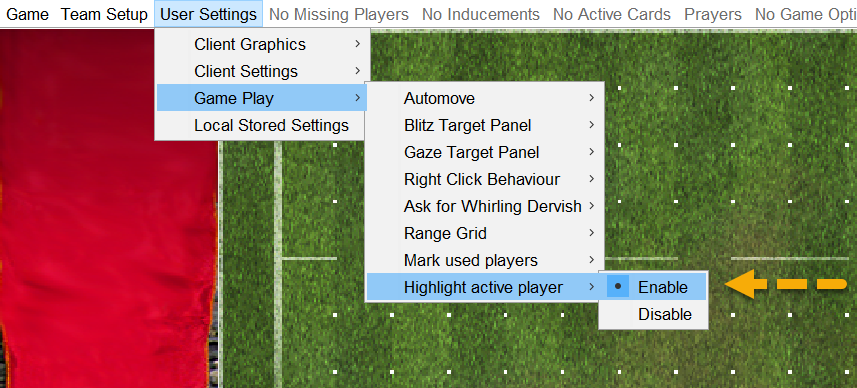
Adding highlight of the active player to the client fumbbl.com.
In previous article I described adding new layout for the client Fantasy Football client (Blood Bowl), adapted for screens with resolution 1920x1080, as well as told where to download it and how to run it.
This time I want to present to you a new feature that I added to the client: highlight of the active player.
Playing Blood Bowl via fumbbl.com, I noticed that when the opponent's turn comes, it is often difficult to understand which player was activated to perform an action. In the official client, the player's icon only turns to profile when activated, which is not immediately noticeable and leads to slight disorientation. Therefore I decided to implement an improvement that will fix this situation and help focus attention on that character who is performing the action. I imagined that it would be great if the activated player started blinking, visually attracting attention to themselves and thereby helping to understand where exactly the move is happening. Below is a video demonstrating the implementation of my idea.